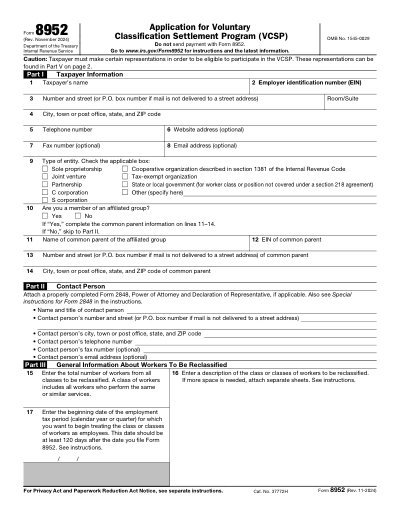
แบบฟอร์ม IRS 8952 Application for Voluntary Classification Settlement Program

แบบฟอร์มพิมพ์ได้ ปี 2025

ยอดเยี่ยม Trustpilot stars 42,014 รีวิวบน

This website is not affiliated with any government agency or tax authority.
อัปเดตล่าสุด: 03/2024 กรุณาตรวจสอบว่าเป็นเวอร์ชันปัจจุบันก่อนใช้งาน

กรอกและส่ง 8952 Application for Voluntary Classification Settlement Program ได้ง่ายๆ

ทำตามขั้นตอนง่ายๆ เพื่อกรอก เซ็น และส่ง 8952 Application for Voluntary Classification Settlement Program ออนไลน์

01

กรอกข้อมูลในแบบฟอร์ม

โปรแกรมแก้ไขที่ใช้งานง่าย ช่วยให้คุณกรอกข้อมูลส่วนตัวและข้อมูลธุรกิจลงใน 8952 Application for Voluntary Classification Settlement Program ได้อย่างรวดเร็ว

02

เซ็นแบบฟอร์ม

เพิ่มลายเซ็นอิเล็กทรอนิกส์ลงใน 8952 Application for Voluntary Classification Settlement Program เพื่อยืนยันว่าเอกสารมาจากคุณโดยตรง

03

ส่งให้ผู้รับ

ดาวน์โหลดแล้วพิมพ์หรือแชร์ 8952 Application for Voluntary Classification Settlement Program ที่เซ็นแล้วให้ผู้รับได้ทันที

กรอก 8952 Application for Voluntary Classification Settlement Program ออนไลน์ได้อย่างไร?

ทำตามขั้นตอนเหล่านี้เพื่อกรอก 8952 Application for Voluntary Classification Settlement Program ออนไลน์ให้ครบถ้วน

Step 01

Access the form through the IRS website or a PDF editor.

Step 02

Fill in your business details and EIN.

Step 03

Complete the eligibility section to confirm participation in the VCSP.

Step 04

Review the information for accuracy.

Step 05

Sign the form before submission.

8952 Application for Voluntary Classification Settlement Program ใช้สำหรับอะไร?

Form 8952 is used by eligible employers to apply for the Voluntary Classification Settlement Program (VCSP), which allows them to voluntarily reclassify their workers as employees for future tax periods. This program helps employers resolve past worker classification issues and achieve compliance with reduced penalties.

ใครต้องกรอก 8952 Application for Voluntary Classification Settlement Program

Eligible employers seeking to voluntarily reclassify workers as employees under the VCSP.

What is Form 8952?

It is the application form for the Voluntary Classification Settlement Program, allowing eligible employers to reclassify workers as employees.

When should Form 8952 be submitted?

It should be submitted at least 60 days before the desired effective date of worker reclassification.

What should I do if I make an error on my form?

Submit a corrected form as soon as possible to avoid processing delays.

พร้อมกรอก 8952 Application for Voluntary Classification Settlement Program แล้วหรือยัง?

เริ่มกรอกแบบฟอร์มออนไลน์ได้ในไม่กี่นาที รวดเร็ว ปลอดภัย และฟรีทั้งหมด

Our users speak for themselves

คุณภาพที่ได้รับการยืนยันจากผู้ใช้งานจริง

Great
Trustpilot
Verified

"The folks at Convert2 were just wonderful at helping me resolve a very important issue. I would highly recommend them because there is someone actually paying attention and reaching out to help those who use their service!"

E

Eugene

Mar 20, 2026

Verified

"I wanted to convert a PDF quickly and this tool made it very easy. Everything worked great, and I didn't have to deal with any confusing process."

B

Bosmat Shelef

Feb 4, 2026

Verified

"I needed to convert a PDF quickly and this tool made it easy. Everything worked as expected and I didn't have to deal with any confusing steps."

E

Elibz

Feb 4, 2026

Verified

"Super great and easy to use"

D

Drew Mascia

Feb 28, 2026

คำถามที่พบบ่อย

Convert2 คืออะไร?
Convert2 คือชุดเครื่องมือจัดการ PDF และเอกสารออนไลน์ครบวงจร ใช้งานได้เลยบนเบราว์เซอร์ ไม่ว่าจะแก้ไข กรอกข้อมูล รวม แยก บีบอัด หมุน แปลง หรือทำ OCR ไฟล์ รองรับทั้งหน้าฟอร์มสำเร็จรูปและเครื่องมือแก้ไขในเบราว์เซอร์สำหรับงานเอกสารทุกประเภท
Convert2 ปลอดภัยไหม?
ปลอดภัยแน่นอน Convert2 ออกแบบมาโดยให้ความปลอดภัยเป็นสิ่งสำคัญอันดับแรก ทั้งในส่วนของการอัปโหลดไฟล์และการจัดการบัญชี ระบบโครงสร้างพื้นฐานมีความปลอดภัยสูง ไฟล์ชั่วคราวจะถูกประมวลผลและลบออกโดยอัตโนมัติ ส่วนการดำเนินการด้านบัญชีและการสมัครสมาชิกผ่านระบบหลังบ้านที่ผ่านการตรวจสอบแล้ว
Convert2 เป็นแบบสมัครสมาชิกหรือซื้อขาด?
Convert2 ใช้ระบบสมัครสมาชิกพร้อมหลายแผนให้เลือก ทั้งแบบทดลองใช้และแบบรายเดือน แผนที่แสดงอาจแตกต่างกันตามประวัติการใช้งาน เช่น สิทธิ์ทดลองใช้ และโปรโมชันพิเศษอาจขึ้นอยู่กับเงื่อนไขของบัญชีแต่ละราย
แก้ไข PDF บน Convert2 ทำอย่างไร?
เปิด Convert2 แล้วอัปโหลดไฟล์ของคุณ จากนั้นเข้าสู่โหมดแก้ไข คุณสามารถกรอกข้อมูลในฟิลด์ ปรับแต่งเนื้อหา และดำเนินการต่างๆ กับเอกสารได้ เมื่อเสร็จแล้วก็ดาวน์โหลดไฟล์ที่อัปเดตแล้วได้ทันทีในหน้าเดิม
Convert2 มีฟีเจอร์อะไรบ้าง?
Convert2 รองรับการแก้ไข PDF, กรอกแบบฟอร์ม, รวม PDF, แยก PDF, ลบหน้า, หมุนหน้า, บีบอัด PDF, OCR และเครื่องมือแปลงไฟล์หลากหลายรูปแบบ เช่น PDF เป็นรูปภาพ, รูปภาพเป็น PDF, PDF เป็น DOCX, ไฟล์ Office เป็น PDF, PDF เป็น EPUB/RTF/ตาราง Excel และการแปลงรูปแบบไฟล์ภาพ
Convert2 รองรับไฟล์ประเภทใดบ้าง?
Convert2 รองรับการทำงานกับ PDF เป็นหลัก และยังรองรับการแปลงไฟล์ Office และรูปภาพผ่านเครื่องมือเฉพาะทาง ครอบคลุมรูปแบบเอกสารและไฟล์ภาพที่ใช้งานทั่วไปในสภาพแวดล้อมการทำงาน
ถ้าเกิดข้อผิดพลาดควรทำอย่างไร?
หากเกิดปัญหา ให้ลองอัปโหลดไฟล์ใหม่และเริ่มต้นใหม่อีกครั้ง หากยังพบปัญหาอยู่ สามารถติดต่อทีมสนับสนุนของ Convert2 ผ่านช่องทางที่แสดงไว้ที่ด้านล่างของเว็บไซต์ เพื่อให้ทีมงานตรวจสอบพร้อมข้อมูลบัญชีและเซสชันของคุณ
จะเลือกเครื่องมือ PDF ออนไลน์ที่เหมาะสมได้อย่างไร?

ควรตรวจสอบว่าแพลตฟอร์มนั้นรองรับครบทุกขั้นตอนที่ต้องการ ทั้งแก้ไข แปลงไฟล์ บีบอัด และกรอกแบบฟอร์ม มีระบบบัญชีและการชำระเงินที่เชื่อถือได้ รวมถึงมีการประมวลผลที่ปลอดภัยและช่องทางสนับสนุนที่ชัดเจน Convert2 ออกแบบมาให้ใช้งานได้ครบในที่เดียวบนเบราว์เซอร์ ไม่ต้องสลับไปใช้หลายเครื่องมือ
/ 1
100%